
Meet Talent Showcase: A Smarter Way to Find Your Next Hire
Finding the right person for your team should not begin with hours of sorting through applications or resumes that do not match your needs.
Our Talent Showcase gives employers a faster and more proactive way to explore available professionals throughout North Carolina and South Carolina. Instead of posting a position and waiting for candidates to respond, hiring managers can browse talent, review qualifications, identify potential matches, and connect directly with our recruiters.
Whether you need a permanent employee, temporary support, a contract professional, or specialized expertise for an important project, our Talent Showcase can help you begin your search with greater visibility and direction.
Here is how to use the Talent Showcase and how to get the most value from every search.
What Is the Talent Showcase?
The Talent Showcase is Godshall Recruiting’s online candidate search platform for employers hiring across South Carolina and the Carolinas. It allows businesses to browse profiles of available professionals and review information such as:
- Skills and areas of expertise
- Professional experience
- Location
- Availability
- Employment category
- Hourly rate and salary, when applicable
Employers can also search by location and skill, save searches, register for talent notifications, and submit an inquiry when they find someone they would like to discuss.
It is designed to complement Godshall’s personalized recruiting services by giving employers immediate visibility of talent that may already be available.
Step 1: Begin by Defining What Your Business Actually Needs
Before opening the Talent Showcase, take a few minutes to clarify the problem you are trying to solve.
- Do we need a permanent employee or short-term support?
- Is this person filling an established position or completing a specific project?
- Which skills are absolutely required?
- Which qualifications would be helpful but are not essential?
- Does the person need to work locally, or can the position be remote?
- How quickly do we need someone to begin?
- What level of experience does the work require?
A clear hiring profile will make your Talent Showcase search more productive. Rather than searching for a broad title such as “marketing professional,” for example, you might determine that you need someone with SEO, Google Analytics, content management, and digital campaign experience.
The more clearly you understand the business need, the easier it becomes to recognize a strong candidate.
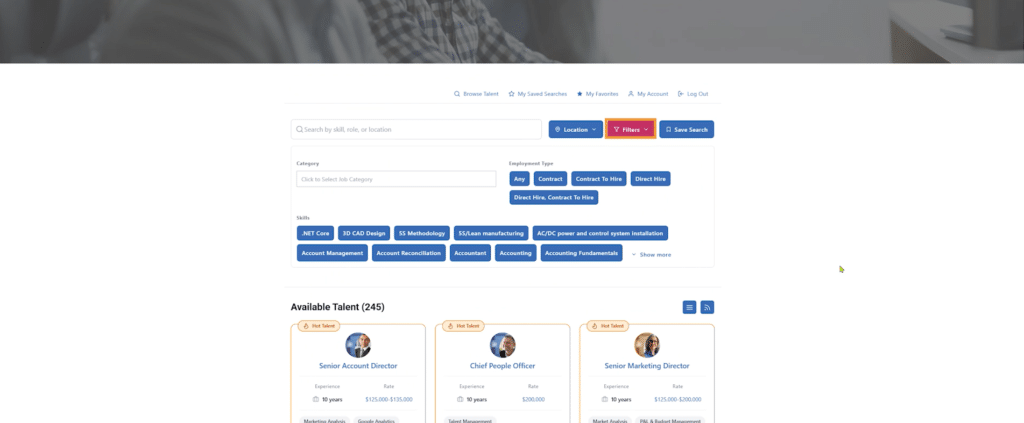
Step 2: Search Available Talent in the Carolinas by Location
Begin your search by selecting the location that best matches your hiring needs.
The Talent Showcase includes professionals in Greenville, Spartanburg, Anderson, Charleston, Columbia, Charlotte-area markets, and other locations. Depending on the position, you may also find candidates who can work remotely, relocate, or support a project from outside your immediate area.
Step 3: Use Skill Filters Strategically
One of the most valuable Talent Showcase features is the ability to search for specific skills.
Available filters cover a wide range of professional and technical capabilities, including areas such as:
- Accounting and Finance
- Administrative Support
- Engineering
- Healthcare
- Human Resources
- Information Technology
- Insurance
- Legal
- Manufacturing
- Marketing
- Operations
- Project Management
- Sales
- Executive Leadership
You can also search for more specific capabilities, including software platforms, certifications, technical systems, business processes, and industry experience.
Start With Your Most Important Skill
Begin with the qualification that would be hardest to teach after hiring. This may be a professional certification, specialized software platform, industry background, technical skill, or leadership experience.
Then add one or two supporting skills.
Using too many filters at once can unnecessarily narrow your results. Begin with the essentials, review the available profiles, and refine the search gradually.
Try Related Search Terms
Candidates and employers do not always use the same terminology. If one search produces limited results, try a related term.
For example:
- Search “Power BI” as well as “dashboard development.”
- Search “human resources” as well as “HR.”
- Search “accounts payable” as well as “AP.”
- Search “continuous improvement” as well as “Lean” or “Six Sigma.”
- Search “information technology” as well as “IT support” or “systems administration.”
Using related terms can help you discover qualified professionals whose experience may be described differently than the language in your job description.
Step 4: Review the Entire Candidate Profile
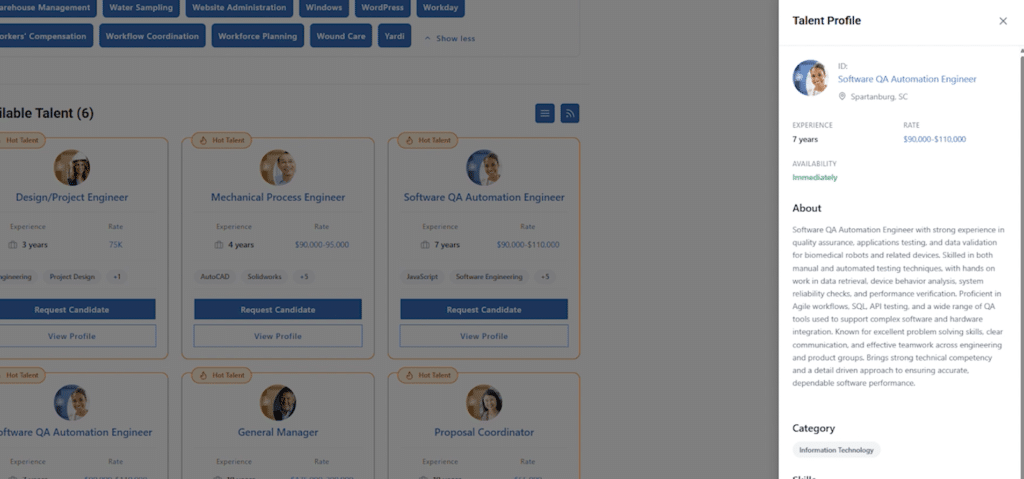
A candidate card provides a helpful overview, but the full profile gives you a better understanding of the person’s potential fit.
Select View Profile and review:
- Professional summary
- Years of experience
- Skills
- Category
- Location
- Availability
- Rate, when listed
- Assigned Godshall recruiter
Do not evaluate candidates based only on a job title. A professional’s skills and experience may be useful in several different roles.
For example, an operations professional with experience in process improvement, data analysis, project management, and team leadership may be able to support a broader range of business needs than the person’s most recent title suggests.
Focus on what the candidate has accomplished, the problems the person may be able to solve, and how those capabilities align with your current priorities.
Step 5: Pay Attention to Availability
Qualified professionals may not remain available for long.
The Talent Showcase may indicate whether a candidate is available immediately, available within a certain number of weeks, or preparing for a future opportunity. Use this information to compare the candidate’s timing with your organization’s hiring schedule.
When you find someone who appears to be a strong match, do not wait until every internal detail is finalized before reaching out. Contacting Godshall does not commit you to hiring the candidate. It simply gives you an opportunity to learn more before another employer moves forward.
The platform was created to help employers gain visibility into available professionals, evaluate potential matches more quickly, and take a proactive approach to recruiting.
Step 6: Request More Information About a Candidate
When a profile catches your attention, select Request Candidate.
You will be asked to provide basic information, including your name, email address, phone number, company, and a message. A Godshall recruiter will then contact you to discuss the candidate and your hiring needs.
Use the message field to provide useful context. Rather than writing only, “I am interested,” include details such as:
- The type of role you are filling
- The most important responsibilities
- Your preferred starting timeline
- Whether the position is contract, temp-to-hire, or direct hire
- The skills that made the candidate stand out
- Any scheduling or location requirements
This gives the recruiter a better understanding of your needs before the first conversation.
Step 7: Save Your Most Useful Searches
Not every hiring need results in an immediate match. That does not mean you need to start from the beginning each time you return.
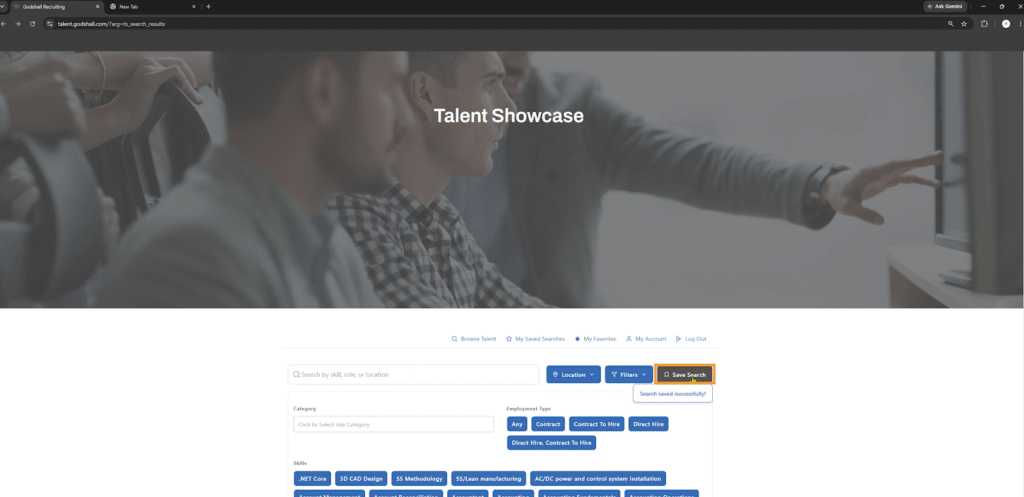
Use the Save Search feature after creating a useful combination of locations, skills, and other filters. Saved searches make it easier to revisit the same talent criteria later.
Consider creating separate searches for recurring needs, such as:
- Accounting and finance talent
- Administrative support
- Engineering professionals
- Human resources specialists
- IT and cybersecurity talent
- Manufacturing and operations leadership
- Marketing professionals
- Project-based consultants
A saved search can also help your organization prepare before a position officially opens. Instead of waiting until someone resigns or a project becomes urgent, you can monitor the market and become familiar with available talent in advance.
How to Get the Most Out of the Talent Showcase
Search Before Posting a Job
Review the Talent Showcase before publishing a new position. A qualified professional may already be available, allowing your organization to move forward without waiting for applications to arrive.
Search by Business Problem, Not Just Job Title
Think about the outcome you need.
Do you need someone to clean up financial reporting? Manage an implementation? Improve production efficiency? Support an employee medical leave? Launch a marketing initiative? Stabilize a department?
Searching for the skills required to solve the problem may reveal candidates you would not have found through a traditional title-based search.
Consider Flexible Hiring Options
The right solution may not always be a permanent employee.
Godshall provides temp-to-hire staffing, contract staffing, direct hire recruiting, executive search, and project-based consulting solutions. These options can help businesses maintain productivity, access specialized expertise, manage changing workloads, and reduce hiring risk.
A candidate shown with an hourly rate, for example, may be able to support a short-term project or important initiative without requiring an immediate permanent hire.
A Smarter Way to Begin Your Next Search
Traditional hiring often begins by posting a job and waiting.
Godshall’s Talent Showcase allows employers to begin differently. You can explore available talent, search by skills and location, review professional profiles, save important searches, receive talent alerts, and connect with a recruiter when you find a promising candidate.
Whether you are hiring one critical employee, adding temporary support, searching for specialized expertise, or planning for future growth, the Talent Showcase gives your business a clearer view of the talent market.
Ready to see who is available?
Browse Godshall Recruiting’s Talent Showcase and discover qualified professionals who can help your business move forward.
Watch the full tutorial of our Talent Showcase Platform